VBA Obfuscator for Excel: Go Beyond Basic Code Scrambling to Truly Protect Your VBA
If you are searching for a VBA obfuscator to hide VBA code in your Microsoft Excel workbooks (
.xlsm, .xlsb) or Excel Add-Ins (.xlam), you already know that Microsoft’s built-in VBA project password is not real security. Anyone with a hex editor or basic password-recovery tool can bypass a standard VBA password in seconds.
While traditional Excel macro obfuscators try to solve this by renaming variables, stripping comments, and scrambling text in a way that is still readable by the VBA interpreter.
At DoneEx, we give Excel developers two enterprise-grade ways to protect Excel VBA code: multi-layered obfuscation with literal removal inside XCell Compiler, and impenetrable native binary compilation with VbaCompiler for Excel.
Why a Standard VBA Scrambler Using an Obfuscator Isn’t Enough
Most VBA minifiers or free obfuscation scripts simply replace readable variable names (like
CalculateTaxRate) with meaningless strings (like x89a_1). While this slows down casual snooping, it has critical weaknesses for commercial spreadsheet developers:- Strings & Secrets Remain Exposed: Basic obfuscators leave hardcoded URLs, API keys, license checks, and SQL connection strings intact—or use simple XOR/Base64 encoding that is easily decoded.
- Step-by-Step Debugging Still Works: A user can still open the Visual Basic Editor (VBE), set breakpoints, and watch how your proprietary algorithms process data in real time.
- VBA Deobfuscators Exist: Automated formatting tools and AI-assisted VBA deobfuscators can reconstruct scrambled control flows back into readable logic.
To achieve true VBA source code protection, you need to either strip the code of its functionality or remove the VBA source code from the workbook entirely.
Two Ways DoneEx Protects Your Excel Macro Source Code
Depending on how your workbook is built, DoneEx offers two distinct approaches to lock your VBA project and safeguard your intellectual property.
1. Multi-Layered VBA Obfuscation & Literal Removal (XCell Compiler)
If your workbook relies heavily on cell formulas alongside macros and you want to compile your spreadsheet into an executable application, DoneEx XCell Compiler includes an advanced, built-in VBA code protector:
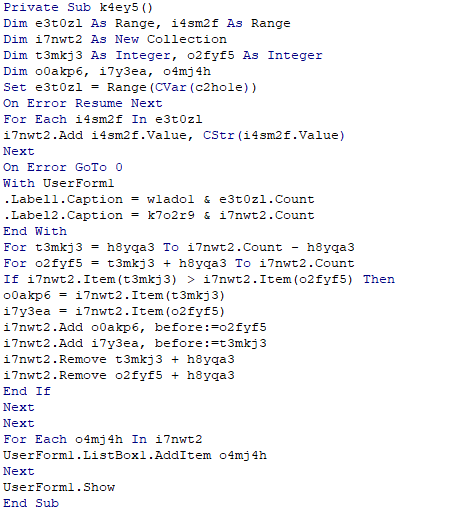
- Code Obfuscation & Minification: Strips all comments, indentation, and formatting while scrambling identifiers into incomprehensible code.
- Literal Removal: Extracts hardcoded values and strings out of the VBA module so the macros cannot function if copied outside of your protected spreadsheet.
- Unviewable VBA Project: Locks the VBA project structure completely and disables VBA debug mode, preventing anyone from opening modules or tracing macro execution.
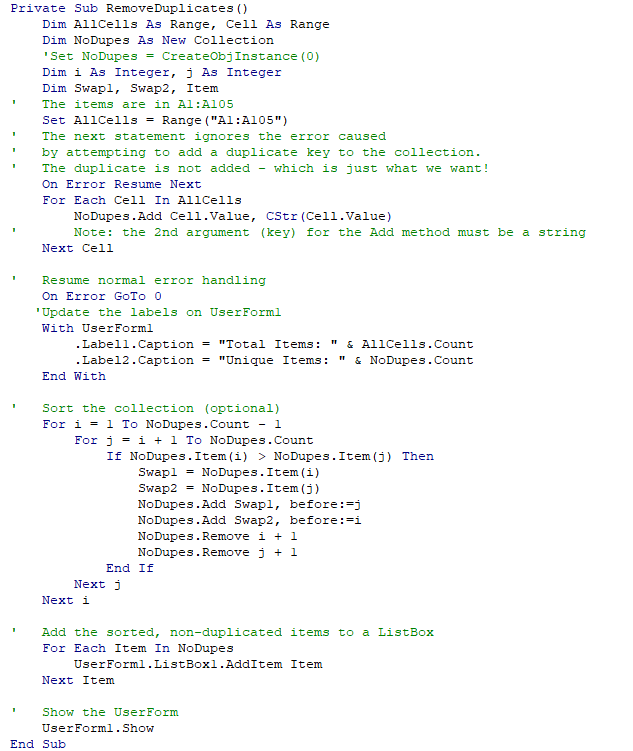
VBA code before obfuscation with an obfuscator:
VBA code after obfuscation with an obfuscator
2. True Binary Compilation: Convert VBA to DLL (VbaCompiler for Excel)
When standard VBA obfuscation isn’t enough—especially for complex algorithms or commercial
.xlam add-ins—DoneEx VbaCompiler for Excel eliminates the source code altogether:- C-Code to Native Windows DLL: Automatically translates your VBA code into C-language code and compiles it into a native 32-bit or 64-bit Windows DLL.
- Zero Source Code Left Behind: Original VBA function bodies are completely removed from the workbook and replaced with calls to the compiled binary DLL. Even if someone unlocks the VBA editor, there is no source code to read, deobfuscate, or reverse-engineer.
- Retains Original File Extensions: Your protected files keep their native
.xlsm,.xlsb, or.xlamextensions (with the DLL embedded directly inside) and run seamlessly without macro security prompts. - Faster Execution Speed: Because your logic runs as compiled machine code rather than interpreted VBA, calculation-heavy loops often execute significantly faster.
Built-In Licensing & Copy Protection for Commercial Developers
Hiding your code is only half the battle if clients can freely copy your spreadsheet and share it with others. Both VbaCompiler for Excel and XCell Compiler allow you to monetize and control distribution without writing custom licensing scripts:
- Hardware ID Locking: Bind your protected workbook or add-in to a specific user’s PC so unauthorized copies will not run.
- Registration Key Generator: Generate unique activation keys (including bulk key generation) for paying customers.
- Time-Limited Trials & Demos: Distribute self-expiring trial versions that automatically lock after a set number of days.
- No Coding Required: Keep developing in standard VBA—DoneEx handles the obfuscation, C-compilation, and licensing automatically with a single click.
VBA Obfuscator Frequently Asked Questions
How do I make a VBA project unviewable without breaking my workbook?
Manual hex-editing tricks to create an unviewable VBA project often corrupt files or trigger antivirus false positives when opened in newer versions of Microsoft 365. DoneEx safely locks the VBA project structure during compilation, ensuring full compatibility across Excel 2007 through Microsoft 365 (32-bit and 64-bit).
Can I obfuscate VBA code in an Excel Add-In (.xlam)?
Yes. While standard XLSM obfuscators often struggle with add-in references, DoneEx VbaCompiler for Excel directly compiles
.xlam and .xla add-ins into native DLLs while preserving the original add-in file extension and ribbon integrations.Does VBA string obfuscation using an obfuscator hide passwords and API keys?
Basic string obfuscation only masks text inside the VBA module, which can still be intercepted in memory during debugging. Using Literal Removal in XCell Compiler or DLL Binary Compilation in VbaCompiler removes those literals from the VBA environment entirely, preventing memory-dump and VBE inspection leaks.
Ready to Lock Down Your Excel VBA Code?
Stop relying on weak VBA passwords and easily reversible code scramblers. Test your own workbook today and see how DoneEx transforms your macros into protected, commercial-grade software.