XCell Compiler vs. VbaCompiler for Excel: Choosing the Right Product
DoneEx offers two specialized products for protecting as well as licensing Excel workbooks: XCell Compiler and VbaCompiler for Excel. Choosing the right solution (XCell Compiler vs VbaCompiler) is essential to ensure optimal compatibility, functionality, and performance when securing Excel workbooks and safeguarding proprietary logic.
XCell Compiler and VbaCompiler for Excel employ different methods to protect Excel workbooks as well as VBA projects from unauthorized access or modification. Both tools enhance workbook security as well as provide integrated licensing features, but they vary in their approach to formula protection, VBA code compilation, and support for specific Excel features.
The following sections describe each product’s functionality, key features, and recommended use cases to help you determine which solution best meets your technical and security requirements.
XCell Compiler
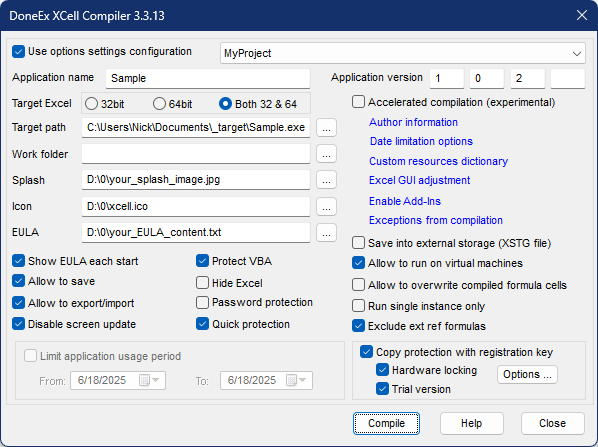
XCell Compiler packages your workbook into a standalone application that requires Microsoft Excel to run while protecting both formulas and VBA code from unauthorized copying. Users interact with it exactly like a normal spreadsheet, but the underlying formulas are converted into binary code, making them invisible and inaccessible for viewing or copying. The XCell Compiler hides and protects VBA code through advanced security measures.
XCell Compiler Key Features:
- Compiles formulas into binary format, making them functional but completely inaccessible to users
- Advanced VBA code protection using a multi-layered approach: obfuscation, literal removal, and “VBA unviewable” technology
- Prevents unauthorized usage with integrated licensing systems
- Built-in registration key generation
- Copy protection with hardware ID locking options
- Supports creation of time-limited trial versions or full functional versions
XCell Compiler has list of restrictions and limitations which VbaCompiler for Excel doesn’t have.
VbaCompiler for Excel

DoneEx VbaCompiler for Excel converts your Visual Basic for Applications code into compiled DLL files that Excel can execute but humans cannot read or modify.
VbaCompiler for Excel Key Features:
- Makes VBA code completely unviewable
- Protects proprietary VBA algorithms and business logic
- May improve VBA code execution speed
- VBA code cannot be reverse-engineered without extreme effort
- Compiled workbook retains the original workbook file format
- Adds licensing features with registration key generation for protected workbooks or Excel add-ins
- Includes hardware binding and copy protection for protected spreadsheets or Excel add-ins
- Supports creation of time-limited trial versions or full functional versions
How to Select Which Product (XCell Compiler vs VbaCompiler) Best Fits Your Needs
Use XCell Compiler (vs Vba Compiler) if:
- Your workbook uses the .xlsx extension
- Your workbook doesn’t contain VBA code
- Your workbook contains VBA, but the primary functionality resides in cell formulas
Use VbaCompiler for Excel if:
- You want to protect Excel Add-Ins (.xla or .xlam files)
- The main logic of your workbook is implemented in VBA code
- Your VBA code manipulates formulas (e.g., copying formulas between cells or writing formulas into cells)
- Your workbook contains VBA code and is referenced by other workbooks.
- Your workbook relies heavily on VBA code and uses Excel features that XCell Compiler doesn’t support, including:
- Dynamic arrays in cell formulas
- Sorting cells containing formulas
- Inserting/deleting rows or columns on worksheets with formulas
- Inserting/deleting worksheets
- Using the GoalSeek method